BrowserAgent and BrowserSkill solve different integration needs.

When to use BrowserAgent

Use BrowserAgent when you want natural-language tasks with optional LLM planning and tool execution.
import { BrowserAgent } from 'mcp-browser-server/agent';

const agent = new BrowserAgent({
  serverUrl: 'http://localhost:3100/mcp',
  aiProvider: 'openai',
  aiModel: 'gpt-4o',
  maxSteps: 20,
});

const result = await agent.run('Open example.com and summarize the page');
await agent.disconnect();

When to use BrowserSkill

Use BrowserSkill when your framework expects a stable skill interface and file outputs.
import { BrowserSkill } from 'mcp-browser-server/skill';

const skill = new BrowserSkill({
  serverUrl: 'http://localhost:3100/mcp',
  saveScreenshots: true,
  screenshotDir: './screenshots',
});

await skill.init();
const run = await skill.execute('Capture reserved domains page details');
await skill.destroy();

Deterministic mode for CI and reliability checks

When you want reproducible behavior, call sequences directly:
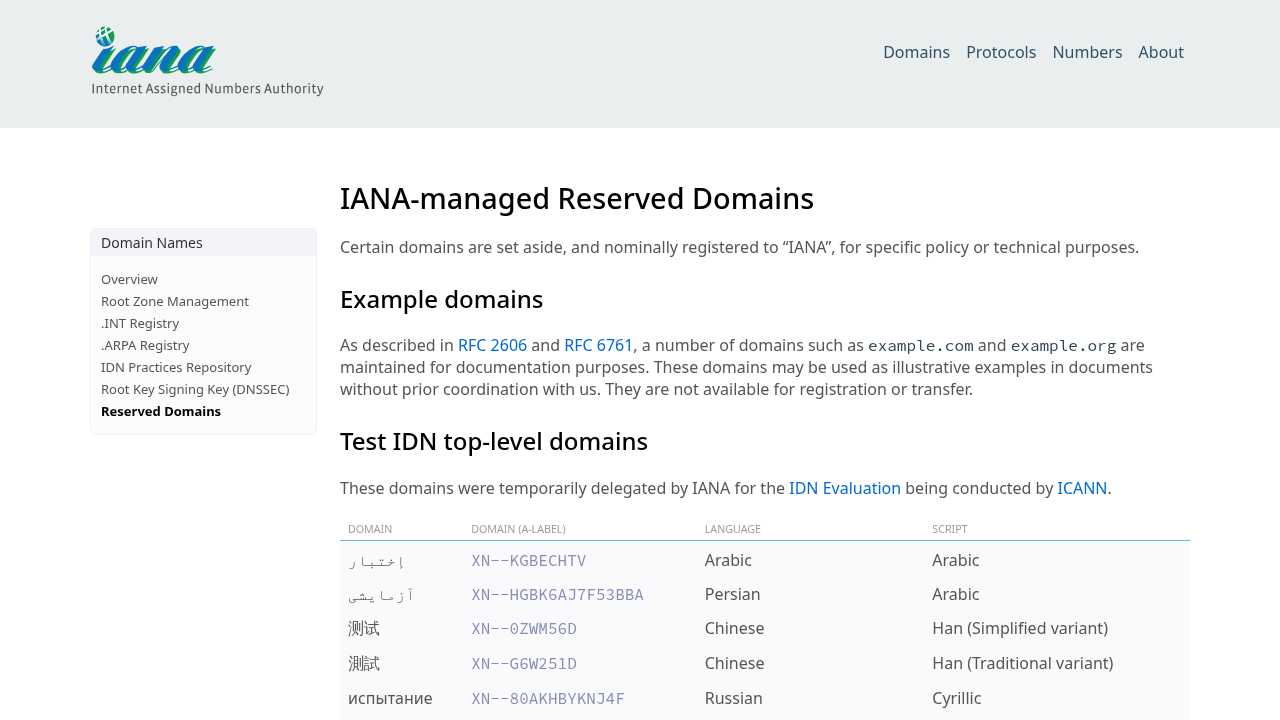
npm run agent -- --server-url http://localhost:3100/mcp --sequence \
  browser_start "browser_navigate?url=https://www.iana.org/domains/reserved" \
  browser_screenshot browser_end
The screenshot below was generated with this exact deterministic sequence. IANA reserved domains page captured through deterministic sequence

Agent configuration (API keys & models)

BrowserAgent accepts provider and model configuration via CLI flags or constructor options when used programmatically. Common flags and env variables:
  • --ai-provider <openai|anthropic>
  • --ai-model <model-name>
  • --ai-api-key <key> or set OPENAI_API_KEY / ANTHROPIC_API_KEY
  • --ai-base-url <url> to override provider endpoints
  • --max-steps <n> to bound agent actions
Example:
OPENAI_API_KEY=sk-... npm run agent -- --server-url http://localhost:3100/mcp \
  --ai-provider openai --ai-model gpt-4o "Open example.com and extract links"
Security: Do not commit API keys. Use CI secrets or host environment variables. Programmatic options: BrowserAgent accepts the same options via its constructor (see README for examples).